~/The Open Local Stack

The Open Local Stack

Working with ComfyUI, Stable Diffusion WebUI, DiffusionBee, and Hugging Face as a designer's daily generative toolkit.

Owning the model loop on the machine in front of you.

There is a version of generative AI that lives behind a paywall and a webform, and there is a version that runs on the laptop you already paid for. I work in the second one. The local stack is where I learn what these models actually do, where I keep authorship of the result, and where I can build a workflow that survives a vendor’s roadmap.

The three apps below are how I move between accessibility, iteration, and control. Hugging Face is where the parts come from.


DiffusionBee: zero friction

DiffusionBee is the on-ramp. One installer, no Python environment, no GPU configuration. It runs Stable Diffusion locally on Apple Silicon and gets a non-technical collaborator generating images in minutes. I keep it on my Mac for the same reason I keep Preview installed: it is fast, it works, and it is the right tool when the question is “can we see this idea in the next ten seconds.”

It is also the right answer when I am teaching. A student who has never opened a terminal can sit down with DiffusionBee and learn what a prompt is, what a seed is, and how a checkpoint shapes a result, without ever touching configuration.

Stable Diffusion WebUI: the iteration room

AUTOMATIC1111’s Stable Diffusion WebUI is where I go when I need to push a single idea hard. It is a browser interface over a local SD install with every knob exposed: samplers, schedulers, CFG scale, hires fix, inpainting, img2img, seed locking, prompt weighting, X/Y/Z plots for batch comparison.

This is the app behind my Bootlegs series and the first stock-photo experiment. The shape of the work is iterative: write a prompt, lock the seed, sweep a parameter, read the grid, change one variable, repeat. It is closer to printmaking than photography. The WebUI is the press.

ComfyUI: the graph layer

ComfyUI is where prompts become workflows and workflows become reproducible artifacts. Every step of the pipeline, model load, prompt encoding, sampling, motion module, VAE decode, video combine, is a node on a canvas. You wire them together. The graph itself is the document.

This is the medium I keep coming back to, because it matches how I think about design systems. A node graph is a typed pipeline. The same composition that produces a still produces a sequence when you swap the sampler for an animated one. A workflow you saved last month can be reopened and edited like a Figma file.

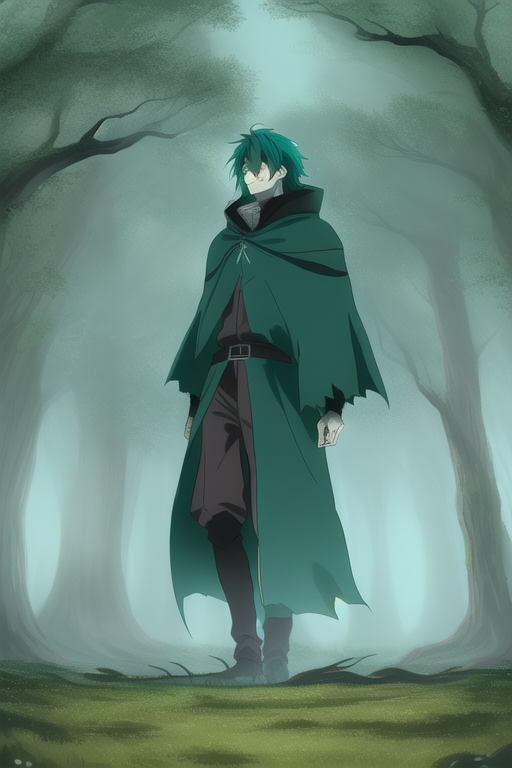
Mobius, sequence still. ComfyUI graph, AnyLoRA checkpoint, AnimateDiff v3 motion module, custom prompt schedule.

A working example: CronenbergMacbeth and the Mobius series

The two pieces I keep returning to are studies in literary tone through a graphic medium. CronenbergMacbeth is exactly what it sounds like: dark fantasy anime stills of a Shakespearean throne room, body-horror staging, a spectral dagger leaving trails of purple smoke. The Mobius series, named for the French comics tradition, runs the same scene through a forest, a madness vignette, a murder. Same workflow, different prompts, coherent visual language.

CronenbergMacbeth still, ComfyUI

The graph behind both: SD 1.5 base with the AnyLoRA checkpoint for line-driven anime style, AnimateDiff (v3_sd15_mm) as the motion module, standard uniform context options at 16-frame chunks with pyramid scheduling for temporal coherence, a negative prompt block to push away photorealism, and a video combine node at the end. Nothing exotic. The interesting part is that the workflow is portable. I hand it to the next collaborator and they get the same starting point, not a rumor of one.

Mobius: Forest

Mobius: Madness

Scaling a workflow into a body of work

Once a workflow is solid, the question stops being “can I make this image” and starts being “can I make a series.” I built a channel-surfing study, sixteen short scenes labeled like television slots: action, commercial, news, talkshow, movie, recruitment, mecha. Same graph, parameterized prompts, same motion module, different scene cards.

Channel 03: action

Channel 13: movie

This is the part of generative work that maps cleanly to design systems. A single workflow plus a clear taxonomy of variations produces a coherent set. The taxonomy is the design decision; the model is the renderer.

Hugging Face: the resource layer

None of this works without Hugging Face. It is the public registry the open ecosystem runs on: base checkpoints (SD 1.5, SDXL, FLUX), specialty checkpoints (DreamShaper, AnyLoRA), motion modules (AnimateDiff, AnimateLCM), LoRAs for everything from 90s anime line work to dark fantasy palettes, ControlNet weights for pose and edge conditioning, VAEs, CLIP variants, embeddings.

A working ComfyUI install is a folder of weights pulled from Hugging Face, organized by type, referenced by node. The model card on each repo tells you license, training data, and intended use. Treating the registry as part of the design library is the move. Pinning specific revisions, reading the licenses before shipping client work, and keeping a written list of what is loaded for what project is how this stays professional rather than a folder of mystery binaries.

Why I work this way

A designer who only knows the hosted tools is a designer renting their pipeline. A designer who can stand up the open stack on a laptop is a designer who can answer questions about the work: what model produced this, under what license, with what controls, and how do we reproduce it next quarter when the team has grown.

The local stack is also where the next thing usually shows up first. Motion modules, ControlNet variants, new samplers, video pipelines, they land on Hugging Face and ship as ComfyUI nodes weeks before the SaaS interfaces catch up. Being there means seeing the medium change in real time, not waiting for it to be packaged.

That is the same reason I work on the open web: I want to own the system that makes the work, not lease it.

From
Abraham Garcia
Studio
Charleston, South Carolina
Email
abe@wrkhrs.co
Phone
(202) 550-7569
Studio site
www.wrkhrs.co
LinkedIn
in/thehonestape